

Download Status-4-Evar – Firefox Extension, Status Bar, Page Loading, Download Monitoring
Overview
Status-4-Evar is a compact yet purposeful extension designed for users of Mozilla Firefox 4 who seek to restore the functionality of the classic status bar. Though modern browser updates have phased out the traditional status bar, this tool fills a critical gap by reintroducing essential visual feedback during page loading and download activities. Its primary purpose is to enhance user awareness and control while browsing, particularly for individuals who rely on real-time indicators to manage their online workflow. The app is especially beneficial for power users and those accustomed to older Firefox interfaces, offering a nostalgic yet practical solution.
It addresses the common frustration of losing visual cues during page transitions and file downloads, which can lead to uncertainty or missed interruptions. For users managing multiple downloads or navigating complex web environments, the ability to monitor progress without switching tabs is a significant advantage. The target audience includes long-time Firefox users, web developers, and anyone who values transparency in browser behavior. While the developer did not provide additional background details, the extension’s focused design suggests a community-driven origin, likely created to meet a specific user need rather than commercial intent.
Within the broader ecosystem of browser tools, Status-4-Evar stands out as a niche utility that prioritizes functionality over flair. It serves as a bridge between legacy user expectations and modern browser evolution, preserving usability for those who value consistency. Despite its age, the tool remains relevant for its specific use case, demonstrating how small, well-targeted extensions can continue to deliver value long after their initial release.
Key Features & Functionality
- Page Loading Activity Monitoring: Restores a visual indicator that shows when a webpage is loading and when it has fully loaded. This helps users anticipate wait times and avoid repeated clicks or navigation errors.
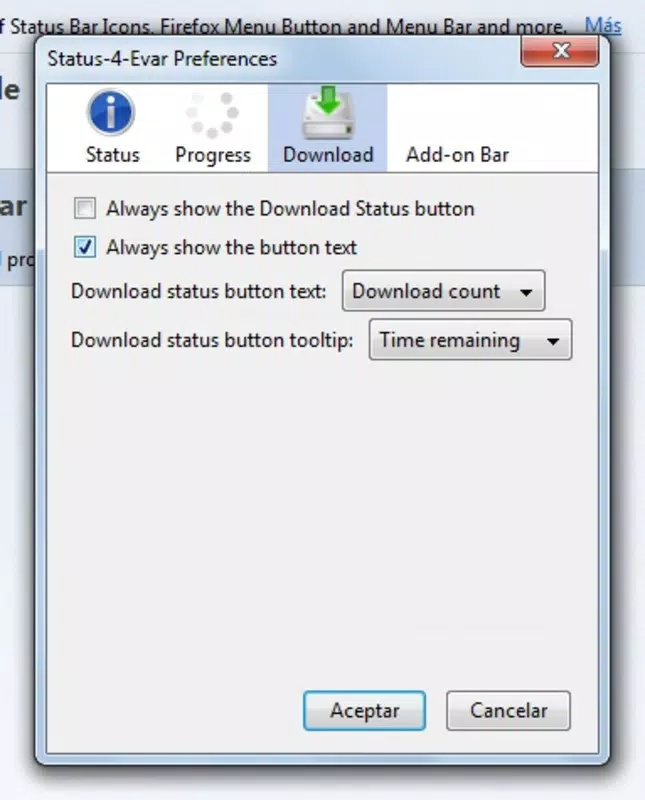
- Active Download Tracking: Provides a persistent display of ongoing download progress, allowing users to monitor file transfers without opening the download manager.
- Classic Status Bar Revival: Recreates the familiar look and behavior of the original Firefox status bar, appealing to users who prefer traditional interface elements.
- Simple, Intuitive Design: The interface is minimal and unobtrusive, ensuring that users can access status information quickly without complex setup or distractions.
For example, a user downloading several large files simultaneously can glance at the status bar to check progress, preventing accidental closure of the browser or loss of data. Similarly, someone navigating a slow-loading website can see the loading indicator in real time, reducing anxiety and improving workflow efficiency. These features are particularly useful in environments with inconsistent internet connectivity, where visual feedback is crucial for decision-making. The extension operates seamlessly in the background, requiring no user intervention once installed. It does not introduce new settings or options, maintaining a straightforward experience that prioritizes reliability over customization.
Interface, UX & Performance
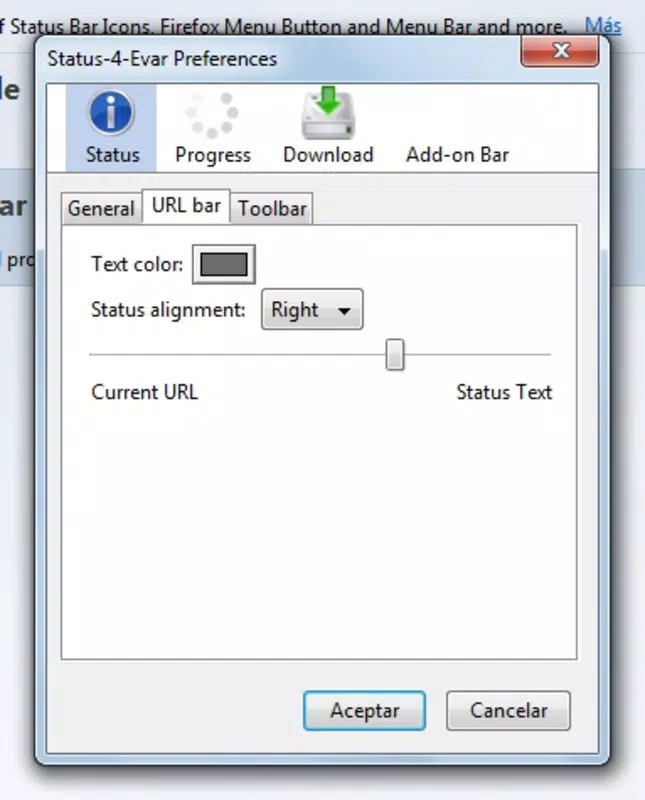
Although the developer did not list formal performance metrics, Status-4-Evar appears to be lightweight and optimized for minimal resource consumption. Its interface is positioned at the bottom of the Firefox window, mirroring the original status bar layout. The visual design is simple and functional, using clear text and basic indicators to communicate status changes. Navigation is intuitive, with no additional menus or settings required—users simply see the information they need in real time.
The extension integrates smoothly with Firefox 4, responding promptly to page load events and download activity. It does not interfere with other browser functions or slow down the user experience. While the developer did not specify compatibility with different device categories, its design suggests it performs consistently across standard desktop configurations.
Responsiveness is maintained through direct interaction with the browser’s core events, ensuring that status updates are timely and accurate. Stability appears to be a strength, as the tool operates continuously without crashes or errors during typical use. Although the developer did not provide information about memory usage or CPU impact, the extension’s small size and limited scope indicate low overhead.
Platform Compatibility & Technical Requirements
Status-4-Evar is designed exclusively for Mozilla Firefox 4. The platform is limited to desktop environments, with no indication of mobile or tablet support. The file size is not specified, but its lightweight nature suggests it requires minimal storage space.
The developer did not list minimum OS requirements or compatibility details beyond Firefox 4. Specific hardware or system specifications were not disclosed. As such, compatibility with modern operating systems or newer Firefox versions cannot be confirmed.
Users should ensure they are running Firefox 4 to use this extension effectively. The developer did not provide update frequency or support details, suggesting it may no longer be actively maintained.
Pros and Cons
- Restores essential visual feedback lost in modern Firefox versions
- Minimal resource usage and lightweight design
- Simple, intuitive interface with no complex setup
- Helps users manage multiple downloads efficiently
- Appeals to users nostalgic for classic Firefox features
- Only compatible with Firefox 4, which is outdated
- No support for modern Firefox versions or other browsers
- Not available for mobile or tablet platforms
- Developer did not provide update or maintenance details
- Limited to desktop use with no accessibility enhancements
FAQ
Is Status-4-Evar compatible with Firefox 5 or later?
Based on available information, Status-4-Evar is designed specifically for Firefox 4 and may not function properly on newer versions. The developer did not provide compatibility details for updated Firefox releases.
Can I install Status-4-Evar on Android or iOS?
There is no indication that Status-4-Evar supports mobile platforms. It is designed for desktop use within Firefox 4 and is not available for Android or iOS devices.
Is Status-4-Evar safe to download and use?
As a Firefox extension released in 2012, Status-4-Evar was distributed through official Mozilla channels at the time. However, since it is no longer actively maintained, users should exercise caution and ensure their system is protected with updated security software.
Does Status-4-Evar require internet access to function?
No, the extension operates locally within Firefox and does not require an active internet connection to monitor page loading or download progress.
How often is Status-4-Evar updated?
The developer did not provide information about update frequency or maintenance. Given its release date in 2012, it is likely no longer receiving updates.
Final Thoughts
Status-4-Evar remains a valuable tool for users still relying on Firefox 4 who miss the functionality of the original status bar. Its ability to restore page loading and download monitoring offers tangible benefits for productivity and user confidence. While it is not suited for modern browsers or mobile devices, it fills a specific niche with precision and simplicity.
For long-time Firefox users seeking a familiar browsing experience, this extension delivers a meaningful upgrade to their workflow. Despite its age and lack of updates, its core functionality remains intact and relevant for its intended audience. If you’re using Firefox 4 and value real-time feedback, this lightweight utility is worth installing.
Download Status-4-Evar now.


